

Lineage OS 14.1 Rom Info :
| Rom Name | Lineage OS |
| Based On | Cyanogenmod |
| Rom OS Version | Android Nougat v7.1.2 |
| Rom Type | Deodex |
| Status | Stable |
| Current Stable Version | Unofficial Beta |
| Stable Build Date | 14-Sep-2017 |
| Stock OS Version | Android Kitkat v4.4.2 |
| Kernel Version | 3.4.67+ |
| Chipset | MediaTek – MT6572 |
| Developer | Lineage OS™ |
| Powered By | Rom Claims™ |
| Ported By | Aditya Kr |
| Ported For | Micromax A102 |
| Supported Language | Multi Language Supported |
| Rom Ported Date | 14-Sep-2017 |
Lineage OS 14.1 Features :
– Smooth And Stable
– Dual Sim Card
– Pure Nougat Rom & Fully Deodex
– Based on cm14.1
– Very fast and smooth
– Wifi
– Hotspot
– Bluetooth
– Ril
– Audio
– Camera
– Vpn
– FM Radio
– Internet Connection
– Offline Charging
– Audio Recording
– Video Recording
– Sensor
– Adb root
– Headphone
– USB Connected to PC
– And many more…
Lineage OS 14.1 Bugs :
– Sim 2 Call’s does not working [Only Incoming/Outgoing Show but Telephony Crash After Connecting]
Lineage OS 14.1 Changelogs :
– Camera Fixed
– Wifi Fixed
– Hotspot Fixed
– Ril Fixed
– Vpn Fixed
– Sensors Fixed
– Rooted Fixed
– Default Storage Fixed
– Audio Recording Fixed
– Offline Charging Fixed
– Etc
Lineage OS 14.1 ScreenShots :
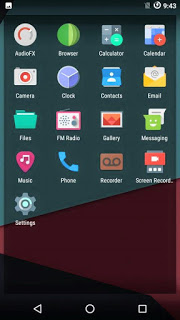
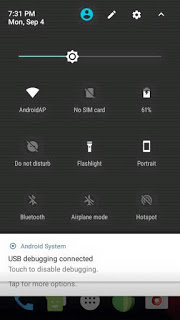

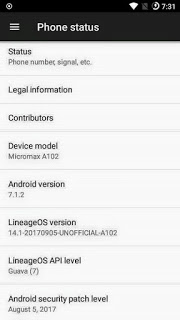
Lineage OS 14.1 Download Link :
– Lineage OS 14.1 Rom For MT6572 [Size : 284.8 MB]
– Gapps [Recommended Arm-7.1.x-Pico]
How To Install Lineage OS 14.1 :
– Download Rom Zip File And Past Sd Card First Page Under.
– Go To Recovery Mode Using TWRP or Philz Recovery.
– Wipe Data, Cache, System, Dalvik Cache.
– Go To Install Option and Select Zip File and Install it.
– After Flash Complete Click Restart and Wait Some Times.
– Done