


Network Engineering | Internet Speed Testing | Bandwidth Measurement | TCP/UDP Analysis | Wi-Fi Performance | VPN Testing | ISP Verification | Termux Tools
আপনার Internet connection কি সত্যিই আপনার ISP-এর advertised speed deliver করছে? আপনার Wi-Fi network-এ কেন speed কমে যাচ্ছে? VPN চালু করলে কত Mbps performance loss হচ্ছে? আপনার server-এর actual network throughput কত? TCP এবং UDP connection-এর মধ্যে performance difference কতটুকু?
এই প্রশ্নগুলোর উত্তর পেতে শুধু সাধারণ Internet speed test যথেষ্ট নয়। Professional network troubleshooting-এর জন্য প্রয়োজন controlled network performance measurement, protocol-level testing এবং proper result analysis.
এই ধরনের practical networking research-এর জন্য iPTS – iPerf3 Test Suite v2.0 একটি interesting Python-based network performance testing utility.
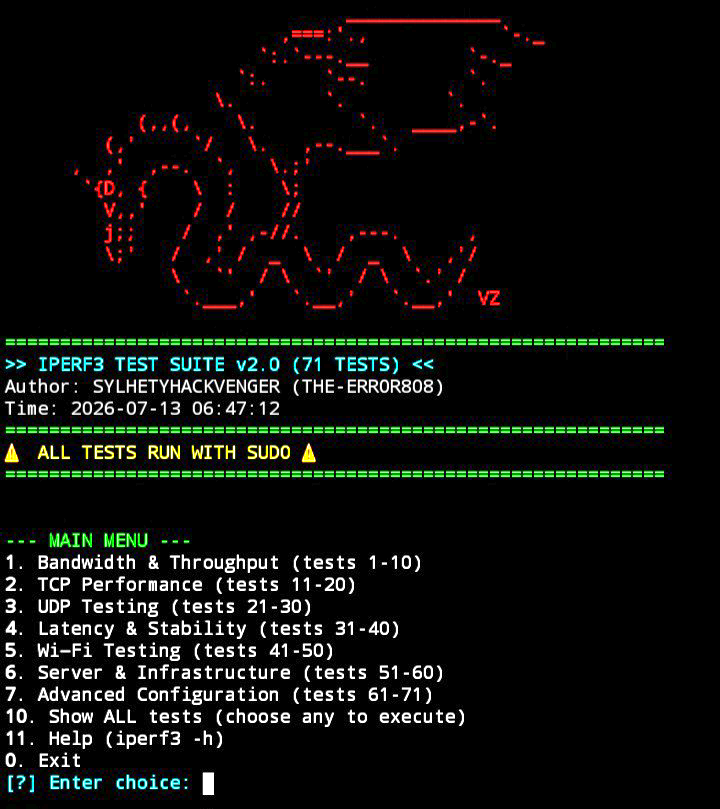
Developed by SYLHETYHACKVENGER (THE-ERROR808), iPTS is an interactive, menu-driven network performance analysis suite that provides 71 pre-built iPerf3 test commands organized into 7 testing categories.
এটি মূলত network engineers, system administrators, ISP technicians, DevOps professionals, cybersecurity students এবং networking enthusiasts-দের জন্য designed.
এই tool-এর সবচেয়ে interesting বিষয় হলো, আপনাকে প্রতিবার manually complex iPerf3 commands লিখে মনে রাখতে হবে না। Instead, একটি organized interactive menu থেকে প্রয়োজনীয় test select করে নিজের authorized network environment-এ performance analysis করতে পারবেন।
Official GitHub Repository: https://github.com/sylhetyhackvenger/iPTS_iperf3-TestSuite
📚 PART 1: Educational Introduction – Understanding Network Performance Testing
1. What is Network Performance Testing?
Network Performance Testing হলো একটি technical process, যার মাধ্যমে কোনো network connection কতটা দ্রুত, stable এবং reliable তা measure করা হয়।
একটি network শুধু Internet browsing করার জন্য ব্যবহৃত হয় না। এটি server communication, cloud applications, video conferencing, online gaming, VPN connectivity, database communication এবং enterprise infrastructure-এর গুরুত্বপূর্ণ অংশ।
একটি network-এর performance evaluate করার জন্য কয়েকটি বিষয় গুরুত্বপূর্ণ:
-
Bandwidth
-
Throughput
-
Latency
-
Jitter
-
Packet Loss
-
TCP Retransmission
-
Connection Stability
-
Network Congestion
এই metrics ব্যবহার করে বোঝা যায় network কোথায় bottleneck তৈরি করছে এবং connection-এর performance কেন expected level-এর নিচে রয়েছে।
2. What is iPerf3?
iPerf3 হলো একটি open-source network performance measurement tool, যা TCP, UDP এবং SCTP traffic ব্যবহার করে network-এর achievable throughput measure করতে পারে।
সহজভাবে বলতে গেলে, iPerf3 দুটি computer বা network endpoint-এর মধ্যে controlled test traffic পাঠিয়ে connection-এর performance measure করে।
এখানে দুটি প্রধান component কাজ করে:
iPerf3 Server: যে device test connection গ্রহণ করে।
iPerf3 Client: যে device server-এর সঙ্গে connect করে test traffic generate করে।
Example network topology:
Client Device → Network / Router / VPN → iPerf3 Server
Client থেকে Server পর্যন্ত traffic পাঠিয়ে network performance measure করা যায়। Reverse mode ব্যবহার করে opposite direction-এও testing করা সম্ভব।
একটি গুরুত্বপূর্ণ বিষয় হলো, iPerf3 সাধারণ Internet speed test-এর মতো কোনো random public speed server-এর ওপর নির্ভরশীল নয়। Testing-এর জন্য compatible iPerf3 server endpoint প্রয়োজন।
Official iPerf3 Project: https://github.com/esnet/iperf
3. Bandwidth vs Throughput – What Is the Difference?
Networking শেখার ক্ষেত্রে এই দুটি বিষয় বোঝা অত্যন্ত গুরুত্বপূর্ণ।
Bandwidth হলো একটি network link-এর theoretical বা configured data-carrying capacity.
Throughput হলো নির্দিষ্ট সময়ে বাস্তবে কত পরিমাণ data successfully transfer হচ্ছে।
Example:
ধরুন আপনার Internet package 100 Mbps.
কিন্তু আপনার actual network throughput যদি 65 Mbps হয়, তাহলে বুঝতে হবে test conditions-এ connection 100 Mbps capacity deliver করছে না।
এর কারণ হতে পারে:
-
Network congestion
-
Wi-Fi interference
-
Router limitations
-
Server limitations
-
VPN overhead
-
TCP configuration
-
ISP network conditions
iPerf3 মূলত এই ধরনের controlled throughput measurement-এর জন্য ব্যবহৃত হয়।
4. What Is TCP Testing?
TCP-এর পূর্ণরূপ Transmission Control Protocol.
এটি একটি connection-oriented transport protocol, যেখানে reliable data delivery, sequencing এবং retransmission mechanism রয়েছে।
TCP সাধারণত ব্যবহৃত হয়:
-
Web browsing
-
HTTPS communication
-
File transfers
-
Database connections
-
SSH
-
Email communication
TCP performance testing-এর মাধ্যমে বোঝা যায় একটি network reliable data transfer-এর ক্ষেত্রে কেমন performance করছে।
TCP testing-এ গুরুত্বপূর্ণ metrics:
-
Throughput
-
Retransmissions
-
TCP Window Size
-
Parallel Streams
-
Congestion Control
-
Connection Stability
iPTS-এর TCP Performance category এই ধরনের testing scenarios cover করে।
5. What Is UDP Testing?
UDP-এর পূর্ণরূপ User Datagram Protocol.
TCP-এর তুলনায় UDP connection-oriented নয়। এটি delivery confirmation এবং retransmission-এর মতো reliability mechanisms নিজে থেকে provide করে না।
UDP সাধারণত ব্যবহৃত হয়:
-
Voice over IP (VoIP)
-
Live video streaming
-
Online gaming
-
Real-time communication
-
DNS queries
-
Multimedia applications
UDP testing-এর মাধ্যমে network-এর packet loss, jitter এবং achievable data rate সম্পর্কে ধারণা পাওয়া যায়।
উদাহরণ:
আপনার network-এ UDP packet loss বেশি হলে VoIP call-এ voice distortion, video streaming-এ interruption এবং real-time applications-এ performance issues দেখা দিতে পারে।
তাই UDP testing শুধু speed measurement নয়; এটি real-time communication quality evaluate করতেও সাহায্য করে।
6. What Are Latency, Jitter and Packet Loss?
এই তিনটি networking concept অত্যন্ত গুরুত্বপূর্ণ।
Latency: একটি packet source থেকে destination-এ পৌঁছাতে যে সময় লাগে।
Jitter: packet delivery latency-এর variation.
Packet Loss: পাঠানো packet-এর কিছু অংশ destination-এ পৌঁছাতে ব্যর্থ হওয়া।
একটি practical example:
ধরুন আপনি online voice call করছেন।
-
High latency হলে conversation delay হবে।
-
High jitter হলে voice irregular বা broken শোনাতে পারে।
-
High packet loss হলে কথা missing বা distorted হতে পারে।
এই কারণে শুধু bandwidth বেশি হলেই একটি network ভালো বলা যায় না। Stable latency, low jitter এবং minimal packet loss-ও গুরুত্বপূর্ণ।
Note: iPerf3-এর UDP tests jitter ও packet loss measurement দিতে পারে। এটি dedicated ICMP ping বা complete end-to-end application quality monitoring tool-এর বিকল্প নয়।
🎓 PART 2: Which Networking Subjects Can You Learn With iPTS?
iPTS শুধু একটি speed testing script নয়। এটি networking-এর কয়েকটি গুরুত্বপূর্ণ academic এবং professional subject practicalভাবে explore করার একটি starting point.
1. Computer Networking Fundamentals
এই subject-এর মধ্যে রয়েছে:
-
Client-server architecture
-
IP addressing
-
Network communication
-
Ports and sockets
-
Data transmission
-
Network interfaces
iPTS ব্যবহার করে client-server communication এবং network throughput measurement-এর practical ধারণা পাওয়া যায়।
2. Transport Layer – TCP/IP Protocol Suite
Networking-এর Transport Layer-এ TCP এবং UDP গুরুত্বপূর্ণ ভূমিকা পালন করে।
এই subject-এর মাধ্যমে আপনি শিখতে পারবেন:
-
TCP connection behaviour
-
UDP packet transmission
-
TCP retransmission
-
Parallel connections
-
Throughput differences
-
Network congestion effects
iPTS-এর TCP এবং UDP categories এই concepts practice করার সুযোগ দেয়।
3. Wireless Networking – Wi-Fi Engineering
Wi-Fi performance শুধু Internet package-এর ওপর নির্ভর করে না।
এটি আরও নির্ভর করে:
-
Wireless frequency band
-
Signal strength
-
Channel interference
-
Access point capacity
-
Client distance
-
Number of connected devices
-
Router hardware
iPTS-এর Wi-Fi testing category বিভিন্ন wireless performance scenarios evaluate করার জন্য তৈরি।
তবে মনে রাখতে হবে, iPerf3 throughput test সরাসরি RF spectrum বা Wi-Fi channel interference measure করে না। এসব বিশ্লেষণের জন্য additional wireless diagnostic tools প্রয়োজন।
4. Network Administration & Troubleshooting
Network Administrator-দের প্রতিদিন বিভিন্ন ধরনের সমস্যার সমাধান করতে হয়।
যেমন:
-
Slow network connection
-
Server bandwidth limitations
-
Router performance issues
-
VPN throughput degradation
-
Unstable network links
-
Network congestion
iPTS-এর predefined test scenarios ব্যবহার করে এসব সমস্যার performance-related evidence collect করা যায়।
5. ISP & Broadband Performance Verification
Internet Service Provider বা ISP-রা নির্দিষ্ট bandwidth package offer করে।
কিন্তু real-world throughput অনেক factor-এর ওপর নির্ভর করে।
নিজের ISP connection verify করতে iPerf3 server যদি ISP network-এর মধ্যে বা উপযুক্ত test location-এ থাকে, তাহলে controlled performance measurement করা সম্ভব।
এতে বোঝা যায়:
-
LAN performance
-
WAN path throughput
-
Available bandwidth
-
TCP transfer performance
-
UDP delivery quality
Important: একটি remote server-এর result একা ISP-এর advertised speed-এর চূড়ান্ত প্রমাণ নয়। Server capacity, routing, peering এবং test endpoint location result-কে প্রভাবিত করতে পারে।
6. VPN & Cloud Networking
VPN একটি encrypted tunnel তৈরি করে network traffic transport করে।
Encryption, encapsulation, routing এবং server location-এর কারণে VPN throughput কমতে পারে।
iPTS-এর VPN testing scenarios ব্যবহার করে authorized VPN endpoints-এর মধ্যে performance compare করা যায়।
এটি useful for:
-
Site-to-site VPN testing
-
Remote access VPN evaluation
-
Cloud connectivity analysis
-
Tunnel throughput measurement
-
Performance comparison
7. Network Infrastructure & Data Center Engineering
Data center এবং enterprise network-এ high-throughput communication গুরুত্বপূর্ণ।
এই subject-এর মধ্যে রয়েছে:
-
Network Interface Cards (NIC)
-
Router performance
-
Switch capacity
-
Firewall throughput
-
Load balancer paths
-
Server-to-server communication
iPTS-এর Infrastructure category এই ধরনের network performance testing scenarios cover করে।
🚀 PART 3: iPTS v2.0 – Main Features
What Makes iPTS Different?
iPTS-এর primary objective হচ্ছে complex iPerf3 command-line operations-কে একটি easy-to-use interactive testing environment-এ নিয়ে আসা।
1. 71 Pre-Built iPerf3 Tests
এই project-এর সবচেয়ে গুরুত্বপূর্ণ feature হলো 71টি predefined testing commands.
এগুলো সাতটি logical category-তে organize করা হয়েছে।
2. Seven Testing Categories
একটি organized menu থেকে specific networking scenario select করা যায়।
3. Interactive Terminal Dashboard
Command-line interface-এর মাধ্যমে test categories browse এবং test select করার সুবিধা রয়েছে।
4. Live Command Execution
Test run করার সময় exact iPerf3 command এবং live verbose output দেখা যায়।
এতে users বুঝতে পারেন কোন parameters দিয়ে test execute হচ্ছে।
5. Optional Port Configuration
Custom server port প্রয়োজন হলে সেটি দেওয়া যায়।
অন্যথায় Enter চাপলে optional port flag বাদ দিয়ে iPerf3-এর default port 5201 ব্যবহার করা যায়।
6. Countdown Timer
প্রতিটি test শুরু হওয়ার আগে 3-2-1 countdown display হয়।
7. Easy Command Selection
Complex iPerf3 syntax manually memorize করার প্রয়োজন কমিয়ে দেয়।
8. Multiple Network Testing Scenarios
Bandwidth, TCP, UDP, Wi-Fi, latency, infrastructure এবং advanced testing scenarios একটি single interface-এ পাওয়া যায়।
📊 PART 4: Complete Breakdown of 71 Tests
এবার আসা যাক iPTS-এর সবচেয়ে গুরুত্বপূর্ণ অংশে।
Repository documentation অনুযায়ী, 71টি tests সাতটি category-তে ভাগ করা হয়েছে।
Category 1: Bandwidth & Throughput Testing (Tests 1–10)
এই category-এর উদ্দেশ্য হলো network connection-এর achievable data transfer capacity measure করা।
এখানে documented testing scenarios:
-
Download throughput measurement
-
Upload throughput measurement
-
UDP throughput measurement
-
WAN capacity testing
-
LAN throughput testing
-
VPN performance testing
-
Cloud network performance
-
Network bandwidth comparison
-
Connection throughput evaluation
-
General bandwidth benchmarking
What will you learn?
-
Network throughput কীভাবে measure করতে হয়।
-
Upload এবং download direction-এর পার্থক্য।
-
LAN ও WAN performance comparison।
-
VPN এবং cloud connection performance evaluation।
Which subject? Network Performance Engineering.
Category 2: TCP Performance Testing (Tests 11–20)
TCP category reliable data transfer performance analysis-এর জন্য।
Documented scenarios:
-
Maximum TCP throughput
-
Multi-stream TCP testing
-
Congestion control evaluation
-
TCP window scaling
-
Connection stability
-
Retransmission analysis
-
TCP throughput comparison
-
Stream performance
-
Long-duration TCP testing
-
TCP performance benchmarking
What will you learn?
-
TCP throughput কীভাবে কাজ করে।
-
Multiple parallel streams কেন ব্যবহার করা হয়।
-
Congestion control কীভাবে performance affect করে।
-
Retransmission কেন গুরুত্বপূর্ণ।
-
TCP connection stability কীভাবে evaluate করতে হয়।
Which subject? TCP/IP Networking and Transport Layer Engineering.
Category 3: UDP Testing (Tests 21–30)
UDP category real-time traffic এবং packet delivery performance analysis-এর জন্য।
Documented scenarios:
-
UDP bandwidth testing
-
Packet loss measurement
-
Jitter measurement
-
VoIP traffic simulation
-
Video traffic simulation
-
UDP packet size comparison
-
Router UDP performance
-
UDP throughput evaluation
-
Datagram delivery analysis
-
UDP performance benchmarking
What will you learn?
-
UDP packet transmission.
-
Packet loss কীভাবে calculate হয়।
-
Jitter কীভাবে interpret করতে হয়।
-
VoIP এবং video traffic-এর জন্য network quality কেন গুরুত্বপূর্ণ।
-
UDP packet size performance-কে কীভাবে প্রভাবিত করে।
Which subject? UDP Networking and Real-Time Communication.
Category 4: Latency & Stability Testing (Tests 31–40)
এই category-এর মূল উদ্দেশ্য হলো network-এর consistency এবং stability evaluate করা।
Documented scenarios:
-
Throughput variation
-
Connection consistency
-
Unstable network link testing
-
Intermittent connection problem analysis
-
Long-running network testing
-
Peak-hour performance
-
Network stability evaluation
-
Throughput fluctuation
-
Performance consistency comparison
-
Long-duration benchmarking
What will you learn?
-
Network performance কেন fluctuate করে।
-
Short test এবং long-duration test-এর পার্থক্য।
-
Peak-hour congestion-এর প্রভাব।
-
Intermittent network problems কীভাবে investigate করতে হয়।
Which subject? Network Reliability and Performance Monitoring.
Note: এই category-র iPerf3 tests throughput stability evaluate করতে পারে; precise latency diagnosis-এর জন্য ping, traceroute বা dedicated latency monitoring tools complementary হিসেবে ব্যবহার করা উচিত।
Category 5: Wi-Fi Testing (Tests 41–50)
Wireless network performance evaluate করার জন্য এই category।
Documented scenarios:
-
2.4 GHz Wi-Fi performance
-
5 GHz Wi-Fi performance
-
Access point capacity
-
Wireless throughput
-
Wi-Fi roaming scenarios
-
Weak signal area testing
-
Multi-stream wireless testing
-
Wireless load performance
-
Wi-Fi connection comparison
-
Wireless performance benchmarking
What will you learn?
-
2.4 GHz এবং 5 GHz Wi-Fi band-এর পার্থক্য।
-
Wireless throughput কেন পরিবর্তিত হয়।
-
Access point performance কীভাবে evaluate করতে হয়।
-
Client distance এবং signal quality-এর practical impact।
-
Multiple streams-এর effect।
Which subject? Wireless Communication and Wi-Fi Network Engineering.
Category 6: Server & Infrastructure Testing (Tests 51–60)
Enterprise এবং data center network performance testing-এর জন্য এই category।
Documented scenarios:
-
Network Interface Card performance
-
Data center link throughput
-
Load balancer path performance
-
Firewall throughput impact
-
Router throughput
-
Switch performance
-
Server-to-server communication
-
Infrastructure capacity
-
Network path performance
Enterprise network benchmarking
What will you learn?
-
Server network interface performance।
-
Network infrastructure bottlenecks।
-
Firewall এবং router-এর performance impact।
-
Data center connectivity evaluation।
-
Enterprise network capacity planning।
Which subject? Enterprise Networking and Data Center Engineering.
Category 7: Advanced Configuration Testing (Tests 61–71)
Advanced users এবং network engineers-দের জন্য এই category।
Documented scenarios:
-
Custom port testing
-
IPv4 testing
-
IPv6 testing
-
Network interface binding
-
Parallel stream configuration
-
Bidirectional testing
-
JSON output
-
Advanced TCP configuration
-
Advanced UDP configuration
-
Custom network parameters
-
Automation-oriented testing
What will you learn?
-
IPv4 এবং IPv6 performance testing।
-
Custom port configuration।
-
Network interface binding।
-
Parallel stream behaviour।
-
Bidirectional traffic testing।
-
JSON-based output processing।
-
Network testing automation।
Which subject? Advanced IP Networking and Network Automation.
🧪 PART 5: Practical Networking Lab – How iPTS Works
এখন একটি practical networking example দেখা যাক।
ধরুন আপনার কাছে দুটি computer রয়েছে:
Machine A: iPerf3 Server
Machine B: iPerf3 Client
দুটি device একই LAN-এ connected অথবা authorized routed network-এর মাধ্যমে reachable.
Step 1 – Install iPerf3
দুটি machine-এই iPerf3 install থাকতে হবে।
Ubuntu/Debian:
sudo apt update
sudo apt install iperf3
Termux:
pkg update
pkg install iperf3
Step 2 – Start the iPerf3 Server
Machine A-তে execute করুন:
iperf3 -s
Default server port হলো 5201.
Step 3 – Run a Basic TCP Test
Machine B-তে execute করুন:
iperf3 -c SERVER_IP
SERVER_IP-এর জায়গায় Machine A-এর actual IP address ব্যবহার করবেন।
Step 4 – Run a UDP Test
iperf3 -c SERVER_IP -u -b 10M
এখানে 10M হলো configured UDP target bitrate, যা server capacity এবং network condition অনুযায়ী adjust করা উচিত।
Step 5 – Run a Reverse Test
iperf3 -c SERVER_IP -R
এটি reverse direction-এ data transfer করে throughput measurement করতে সাহায্য করে।
Step 6 – Compare the Results
TCP এবং UDP results compare করে নিচের বিষয়গুলো observe করুন:
-
Throughput
-
UDP packet loss
-
UDP jitter
-
TCP retransmissions
-
Connection stability
এভাবেই আপনি practical network performance analysis শিখতে পারবেন।
📲 PART 6: iPTS Installation Guide – Termux & Linux
Requirements
iPTS চালানোর আগে নিচের environment প্রস্তুত রাখুন:
-
Python 3.6+
-
Git
-
iPerf3
-
Linux, macOS অথবা Termux
-
Working network connection
-
Compatible iPerf3 server endpoint
-
Appropriate system permissions
Installation Steps
Step 1 – Update Your Environment
Linux:
sudo apt update
sudo apt upgrade -y
Termux:
pkg update && pkg upgrade
Step 2 – Install Python, Git & iPerf3
Linux:
sudo apt install python3 git iperf3 -y
Termux:
pkg install python git iperf3
Step 3 – Clone the Official Repository
git clone https://github.com/sylhetyhackvenger/iPTS_iperf3-TestSuite
Step 4 – Enter the Project Directory
cd iPTS_iperf3-TestSuite
Step 5 – Make the Script Executable
chmod +x iPTS.py
Step 6 – Launch iPTS
Repository README-তে দেওয়া launch command:
sudo python3 iPTS.py
Termux-এ সাধারণত sudo available থাকে না। Rooted device বা compatible privilege environment ছাড়া এই command সরাসরি কাজ নাও করতে পারে। Termux-এ python3 iPTS.py দিয়ে চালানোর চেষ্টা করুন; script-এর internal SUDO requirement থাকলে unrooted Termux-এ সেটি limitation হতে পারে।
Important: README অনুযায়ী test commands sudo integration ব্যবহার করে। তাই execution-এর আগে source code review করুন এবং প্রয়োজনের অতিরিক্ত root privileges প্রদান করবেন না।
📖 PART 7: Understanding the iPTS Menu
Tool launch করার পর interactive menu পাওয়া যাবে।
Basic workflow:
-
Available test categories browse করুন।
-
Category number 1–7 select করুন।
-
প্রয়োজনীয় test নির্বাচন করুন।
-
iPerf3 server-এর IP address প্রদান করুন।
-
প্রয়োজন হলে custom port দিন।
-
Optional parameters skip করতে Enter চাপুন।
-
Countdown শেষ হলে test execute হবে।
-
Live output দেখে performance analysis করুন।
README অনুযায়ী option 10 ব্যবহার করে সব 71টি tests একসঙ্গে browse করা যায়।
Why Is Server IP Required?
iPerf3 একটি endpoint-based network measurement tool.
এটি test traffic generate করে client এবং server-এর মধ্যে transfer করে।
তাই শুধু tool install করলেই Internet speed test শুরু হবে না। আপনাকে একটি compatible iPerf3 server-এর IP address দিতে হবে।
Server unavailable হলে, firewall port বন্ধ থাকলে অথবা routing issue থাকলে test fail করতে পারে।
📈 PART 8: How to Read iPerf3 Test Results
একটি professional network engineer শুধু test run করেন না; তিনি test result interpret-ও করেন।
নিচের metrics সম্পর্কে ধারণা রাখা প্রয়োজন।
Metric Meaning Bandwidth Network link capacity Throughput Actual measured data rate Jitter Packet delay variation Packet Loss Lost UDP packets Retransmissions TCP segments retransmitted Transfer Total transferred data Bitrate Data transfer rate Duration Test execution time
Example 1 – TCP Throughput
ধরুন test result:
Sender:   92 Mbits/sec
Receiver: 89 Mbits/sec
এর অর্থ test conditions-এ sender এবং receiver-এর reported throughput কিছুটা আলাদা।
এটি network path, protocol behaviour এবং measurement timing-এর কারণে হতে পারে।
Example 2 – UDP Packet Loss
ধরুন UDP test result:
Bandwidth: 10 Mbits/sec
Jitter:    2.5 ms
Lost:      5 / 1000
এখানে packet loss:
0.5%
Calculation:
(5 / 1000) × 100 = 0.5%
এই result থেকে বোঝা যায় test-এর সময় কিছু UDP packets destination-এ পৌঁছায়নি।
এটি VoIP বা real-time communication quality evaluation-এর ক্ষেত্রে গুরুত্বপূর্ণ হতে পারে।
Note: এগুলো illustrative examples, actual iPTS test output নয়।
🏢 PART 9: Real-World Use Cases
1. ISP Speed Verification
আপনার ISP connection-এর throughput নির্দিষ্ট test endpoint-এর মাধ্যমে measure করতে পারেন।
2. Wi-Fi Troubleshooting
একই LAN-এর মধ্যে wired এবং wireless client performance compare করতে পারেন।
3. VPN Performance Evaluation
VPN tunnel চালু এবং বন্ধ অবস্থায় controlled throughput comparison করতে পারেন।
4. Server Capacity Planning
Server network interface কতটা traffic handle করতে পারে তা evaluate করতে পারেন।
5. Data Center Network Testing
Authorized server-to-server links-এর performance benchmark করতে পারেন।
6. VoIP & Video Communication
UDP packet loss এবং jitter evaluate করে real-time traffic-এর network suitability সম্পর্কে ধারণা নিতে পারেন।
7. Network Administration Education
Networking students TCP, UDP, throughput, packet loss এবং network performance measurement practicalভাবে শিখতে পারেন।
👨🎓 PART 10: Who Should Learn and Use iPTS?
Audience Learning benefit Networking Students TCP/IP and UDP fundamentals CCNA Learners Network troubleshooting practice CCNP Learners Advanced network performance concepts ISP Technicians Broadband performance verification System Administrators Server connectivity diagnostics DevOps Engineers Infrastructure benchmarking Cloud Engineers Cloud network performance Wi-Fi Technicians Wireless throughput comparison Cybersecurity Students Network behaviour analysis Network Engineers Performance measurement and capacity planning
Educational recommendation: CCNA বা CCNP certification-এর official syllabus-এর বিকল্প নয় iPTS। তবে networking concepts practicalভাবে বোঝার জন্য এটি supplementary lab utility হিসেবে ব্যবহার করা যায়।
⚠️ PART 11: Important Limitations & Responsible Usage
iPTS হলো iPerf3-based performance testing suite. এটি কোনো magic Internet speed booster নয়।
কিছু বিষয় মনে রাখা জরুরি:
-
iPerf3 server ছাড়া endpoint-based testing করা সম্ভব নয়।
-
Test result server capacity দ্বারা প্রভাবিত হতে পারে।
-
Wi-Fi testing-এর জন্য wireless diagnostics-এর প্রয়োজন হতে পারে।
-
Internet path-এর routing এবং congestion results পরিবর্তন করতে পারে।
-
Heavy UDP testing network congestion তৈরি করতে পারে।
-
Multiple concurrent tests shared network resources consume করতে পারে।
-
Production infrastructure-এ test করার আগে approval নিতে হবে।
Authorized Testing Only: নিজের network, নিজের server অথবা explicit permission থাকা environment-এ testing করুন। অন্যের network-এ অনুমতি ছাড়া high-volume traffic generate করবেন না।
📥 Download iPTS – iPerf3 Test Suite v2.0
আপনি যদি Networking, ISP Performance Testing, TCP/UDP Analysis, Wi-Fi Troubleshooting অথবা Network Engineering শিখতে চান, তাহলে iPTS explore করে দেখতে পারেন।
Official GitHub Repository:
https://github.com/sylhetyhackvenger/iPTS_iperf3-TestSuite
Project Name: iPTS – iPerf3 Test Suite
Version: 2.0
Developer: SYLHETYHACKVENGER (THE-ERROR808)
Programming Language: Python
Underlying Testing Engine: iPerf3
License: MIT License
📝 Final Thoughts – Why iPTS Is Worth Exploring
Networking শেখার ক্ষেত্রে শুধু theoretical knowledge যথেষ্ট নয়। Practical testing, measurement এবং result interpretation-ও সমান গুরুত্বপূর্ণ।
আপনি যদি TCP/IP, UDP, Network Throughput, Wi-Fi Performance, VPN Networking, ISP Verification অথবা Data Center Infrastructure নিয়ে পড়াশোনা করেন, তাহলে iPTS আপনাকে একটি organized practical testing environment দিতে পারে।
71টি predefined test commands এবং সাতটি testing category-এর মাধ্যমে বিভিন্ন network performance scenarios explore করা যায়।
সবচেয়ে গুরুত্বপূর্ণ বিষয় হলো, এই tool আপনাকে networking-এর theoretical concepts-কে practical performance measurements-এর সঙ্গে connect করতে সাহায্য করে।
Learn Networking. Measure Performance. Understand Your Infrastructure.
Developed by SYLHETYHACKVENGER (THE-ERROR808)
Happy Networking! 🚀