


Network Security | Ethical Hacking | hping3 | TCP/IP | ICMP | UDP | Firewall Testing | Network Reconnaissance | Stress Testing
আপনি কি জানতে চান কীভাবে network packets তৈরি হয়, TCP flags কীভাবে কাজ করে, firewall কীভাবে suspicious traffic identify করে, অথবা একটি router অস্বাভাবিক network traffic-এর বিরুদ্ধে কতটা resilient?
Network Security এবং Ethical Hacking শেখার ক্ষেত্রে এই বিষয়গুলো অত্যন্ত গুরুত্বপূর্ণ।
সাধারণ networking tools দিয়ে শুধু connectivity check করলেই network security সম্পর্কে সম্পূর্ণ ধারণা পাওয়া যায় না। Network packet behaviour, protocol inspection, firewall filtering, packet fragmentation এবং traffic-handling mechanisms সম্পর্কেও practical knowledge প্রয়োজন।
এই ধরনের advanced networking concepts explore করার জন্য ANST – Active Network Smashing Tool একটি interesting Python-based network security testing framework.
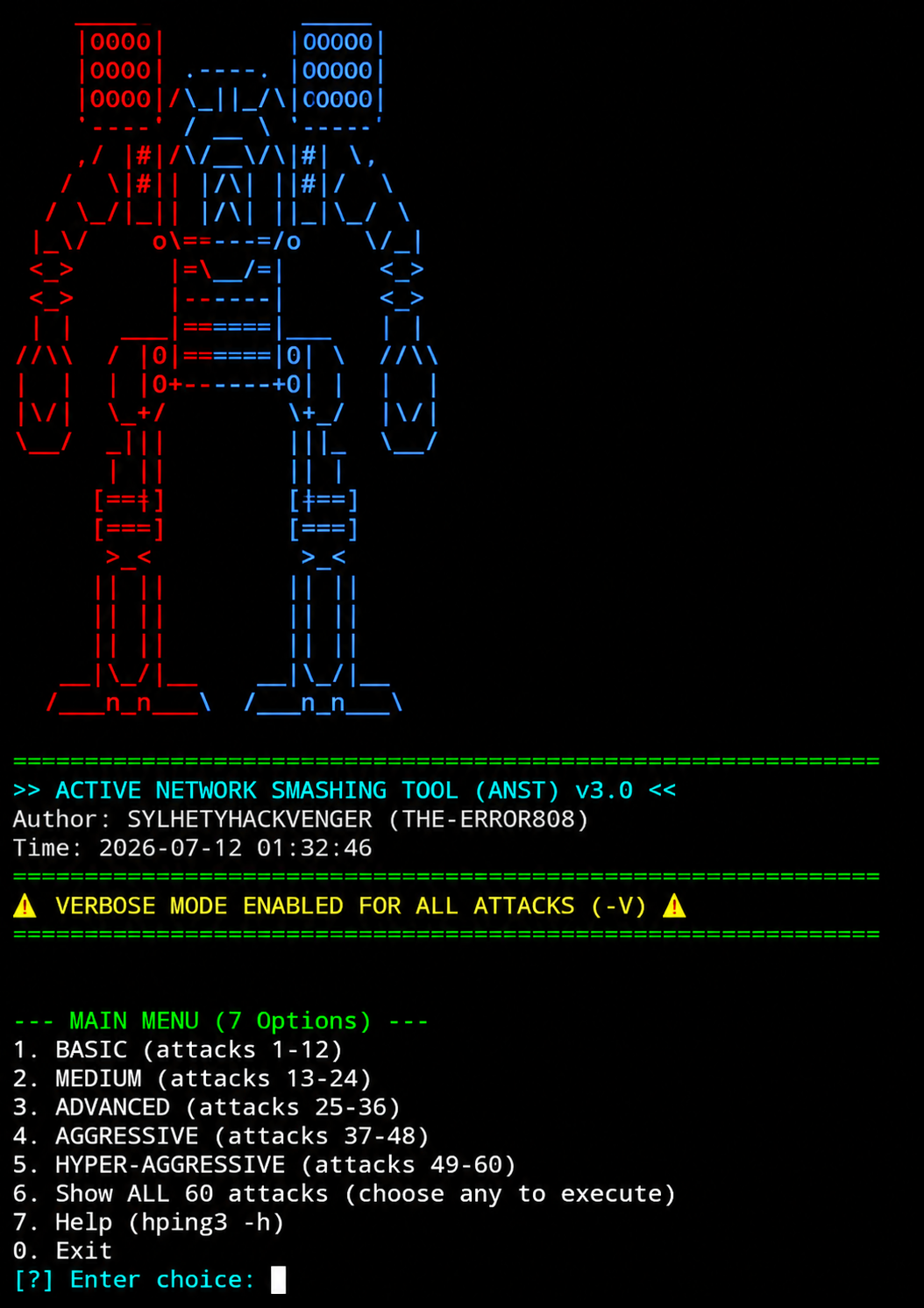
Developed by SYLHETYHACKVENGER (THE-ERROR808), ANST is an interactive, hping3-based network testing framework featuring 60 documented test vectors across five progressive categories.
এর মধ্যে ICMP, TCP, UDP, packet fragmentation, source-address manipulation, firewall assessment এবং network stress-testing-related scenarios অন্তর্ভুক্ত রয়েছে।
Tool-টি Linux এবং Termux environments-এর জন্য documented এবং interactive terminal dashboard-এর মাধ্যমে বিভিন্ন testing categories browse করার সুবিধা দেয়।
Official GitHub Repository:
https://github.com/sylhetyhackvenger/ANST-ActiveNetworkSmashingTool
PART 1: Educational Introduction – Understanding ANST
1. What Is ANST?
ANST-এর পূর্ণরূপ হলো Active Network Smashing Tool.
এটি একটি Python-based interactive network security testing framework, যা underlying packet-generation engine হিসেবে hping3 ব্যবহার করে।
এর মূল উদ্দেশ্য হলো বিভিন্ন network protocol, packet behaviour এবং security-control testing scenarios একটি unified terminal interface-এ organize করা।
Repository documentation অনুযায়ী এতে রয়েছে:
-
60 documented network testing vectors
-
5 progressive testing categories
-
ICMP, TCP এবং UDP-related scenarios
-
Packet fragmentation research
-
Firewall validation scenarios
-
Network reconnaissance
-
Verbose live output
-
Interactive terminal dashboard
-
One-time dependency installation mechanism
এখানে একটি বিষয় পরিষ্কার করা জরুরি: ANST-এর কিছু documented test vector aggressive traffic generation এবং service disruption ঘটাতে পারে। তাই এটিকে সাধারণ ping বা network diagnostic tool হিসেবে বিবেচনা করা উচিত নয়।
এটি মূলত authorized network security assessment এবং controlled laboratory research-এর জন্য একটি high-risk testing framework.
2. What Is hping3?
ANST বুঝতে হলে প্রথমে hping3 সম্পর্কে ধারণা থাকা প্রয়োজন।
hping3 হলো একটি command-line network packet crafting and analysis utility.
এটি বিভিন্ন network protocol ব্যবহার করে custom packets তৈরি এবং network responses পর্যবেক্ষণ করতে পারে।
সাধারণ ping tool মূলত ICMP Echo Request ব্যবহার করে connectivity পরীক্ষা করে।
অন্যদিকে hping3 দিয়ে বিভিন্ন ধরনের TCP, UDP এবং ICMP packet characteristics নিয়ে কাজ করা যায়।
এর মাধ্যমে network engineers এবং security researchers নিচের বিষয়গুলো study করতে পারেন:
-
TCP packet structure
-
TCP flags
-
ICMP response behaviour
-
UDP packet handling
-
IP header fields
-
TTL behaviour
-
Packet fragmentation
-
Firewall filtering
-
Network response analysis
ANST এই ধরনের functionality-কে একটি interactive menu-driven framework-এ উপস্থাপন করেছে।
3. What Is Network Packet Crafting?
Network communication মূলত packets-এর মাধ্যমে সম্পন্ন হয়।
প্রতিটি IP packet-এর মধ্যে header এবং payload থাকে।
IP header-এ বিভিন্ন information থাকে, যেমন:
-
Source IP address
-
Destination IP address
-
Protocol number
-
Time To Live (TTL)
-
Fragmentation information
Transport layer-এ TCP অথবা UDP header থাকতে পারে।
Packet crafting হলো প্রয়োজন অনুযায়ী packet-এর বিভিন্ন field এবং characteristics configure করে তৈরি করার process.
এটি network protocol research, firewall validation এবং intrusion detection system testing-এর একটি গুরুত্বপূর্ণ subject.
Related Subject: Computer Networking and Network Protocol Engineering.
4. Understanding TCP, UDP and ICMP
ANST-এর documented testing scenarios বুঝতে এই তিনটি protocol সম্পর্কে ধারণা থাকা প্রয়োজন।
TCP – Transmission Control Protocol
TCP হলো connection-oriented transport protocol.
এটি reliable data delivery, sequencing, acknowledgements এবং retransmission mechanisms provide করে।
TCP ব্যবহৃত হয়:
-
HTTPS
-
SSH
-
File transfer
-
Database connections
-
Web applications
-
Remote administration
TCP packet-এর কিছু গুরুত্বপূর্ণ flags:
Flag General purpose SYN Connection initiation ACK Acknowledgement FIN Connection termination RST Connection reset PSH Push data to receiving application URG Urgent pointer significance
ANST-এর TCP-related scenarios ব্যবহার করে TCP flag behaviour এবং firewall response সম্পর্কে educational research করা যায়।
UDP – User Datagram Protocol
UDP একটি connectionless transport protocol.
এটি TCP-এর মতো built-in delivery acknowledgement এবং retransmission mechanism provide করে না।
UDP ব্যবহৃত হয়:
-
DNS
-
VoIP
-
Online gaming
-
Live streaming
-
Real-time communication
UDP-related network testing-এর মাধ্যমে packet handling, delivery behaviour এবং network resource consumption study করা যায়।
ICMP – Internet Control Message Protocol
ICMP মূলত network diagnostics এবং error reporting-এর জন্য ব্যবহৃত হয়।
এর common applications:
-
Ping
-
Traceroute
-
Network reachability testing
-
Destination unreachable reporting
-
Time exceeded messages
ANST-এর ICMP-related scenarios network devices কীভাবে diagnostic packets-এর response দেয় তা investigate করার বিষয় অন্তর্ভুক্ত করে।
PART 2: Which Networking Subjects Can You Learn?
ANST-এর documented capabilities কয়েকটি গুরুত্বপূর্ণ academic এবং professional networking discipline-এর সঙ্গে সম্পর্কিত।
1. Computer Networking Fundamentals
এখানে আপনি শিখতে পারবেন:
-
OSI model
-
TCP/IP model
-
IP addressing
-
Network packets
-
Ports and protocols
-
Client-server communication
-
Network routing
Subject: Computer Networking.
2. Transport Layer Security Research
TCP এবং UDP কীভাবে কাজ করে, বিভিন্ন flags-এর উদ্দেশ্য কী এবং network devices কীভাবে transport-layer traffic handle করে তা বোঝা যায়।
Subject: TCP/IP Protocol Engineering.
3. Firewall & Network Access Control
Firewall network traffic-এর বিভিন্ন characteristics পরীক্ষা করে traffic allow অথবা deny করতে পারে।
এই বিষয়গুলো study করতে পারবেন:
-
Stateful firewall
-
Stateless firewall
-
Access Control Lists (ACL)
-
Ingress filtering
-
Traffic filtering
-
Firewall logging
-
Network security policies
Subject: Network Security Administration.
4. Network Reconnaissance
Network reconnaissance হলো কোনো authorized network environment সম্পর্কে technical information collect করার process.
এর মধ্যে থাকতে পারে:
-
Host discovery
-
Port identification
-
Service availability
-
Network topology investigation
-
Router reachability
-
TTL-based path analysis
Subject: Ethical Hacking and Network Discovery.
5. Intrusion Detection & Prevention Systems
IDS এবং IPS network traffic monitor করে suspicious patterns identify করার চেষ্টা করে।
এই subject-এর মধ্যে রয়েছে:
-
Signature-based detection
-
Anomaly detection
-
Traffic inspection
-
Protocol analysis
-
Alert generation
-
Network threat monitoring
Subject: Network Defence and Threat Detection.
6. Network Resilience & Stress Testing
Network resilience বলতে network infrastructure অস্বাভাবিক load বা unexpected traffic conditions-এর মধ্যেও কতটা stable থাকতে পারে তা বোঝায়।
এই subject-এ গুরুত্বপূর্ণ:
-
Resource utilization
-
Connection capacity
-
Traffic handling
-
Rate limiting
-
Service availability
-
Network monitoring
ANST-এর aggressive testing scenarios এই বিষয়গুলোর defensive risk বোঝাতে পারে। তবে production systems-এ এ ধরনের testing করার পরিবর্তে isolated lab এবং non-disruptive monitoring ব্যবহার করা উচিত।
Subject: Network Reliability Engineering.
PART 3: ANST Main Features
1. 60 Documented Test Vectors
Repository-তে 60টি hping3-based testing vectors document করা হয়েছে।
এগুলো বিভিন্ন network protocol এবং security testing scenarios cover করে।
2. Five Testing Categories
Testing vectors পাঁচটি progressive category-তে organized:
-
BASIC
-
MEDIUM
-
ADVANCED
-
AGGRESSIVE
-
HYPER-AGGRESSIVE
3. Interactive Terminal Dashboard
একটি menu-driven interface থেকে available testing categories browse করা যায়।
4. Verbose Live Output
Repository documentation অনুযায়ী commands-এ verbose output enabled রয়েছে।
এতে execution-এর সময় terminal-এ live output দেখা যায়।
5. Smart Dependency Management
Project-এর documented setup mechanism প্রয়োজনীয় dependencies একবার install করার ব্যবস্থা রাখে।
Dependencies-এর মধ্যে রয়েছে:
-
hping3
-
nala
-
tsu
Environment অনুযায়ী package availability এবং privilege requirements ভিন্ন হতে পারে।
6. Visual Terminal Interface
ANST-তে রয়েছে:
-
Cyberpunk-inspired dashboard
-
Loading animation
-
3-2-1 countdown
-
Category-based navigation
-
Interactive selection
7. Linux & Termux Support
README অনুযায়ী Linux এবং Android Termux environment-এ ব্যবহার করার জন্য project-টি designed.
তবে Android version, device architecture এবং root availability অনুযায়ী compatibility আলাদা হতে পারে।
PART 4: Complete Breakdown of 60 Testing Vectors
এখন ANST-এর সবচেয়ে গুরুত্বপূর্ণ অংশ হলো এর পাঁচটি testing categories.
এই section-এ প্রতিটি category কী ধরনের security concepts cover করে তা educational perspective থেকে ব্যাখ্যা করা হয়েছে।
Category 1 – BASIC (Tests 1–12)
Fundamental Network Research
এই category মূলত basic network discovery এবং protocol behaviour investigation-এর জন্য।
Documented testing areas:
-
ICMP Echo Request and host discovery
-
TCP SYN service availability checks
-
TCP port-range reconnaissance
-
UDP DNS response testing
-
Count-limited ICMP diagnostics
-
Rate-controlled packet inspection
-
HTTPS service availability
-
Source-port behaviour research
-
Small-payload latency observation
-
TTL manipulation and hop discovery
-
Router ICMP reachability
-
Router web administration exposure assessment
What can you learn?
-
Host discovery কীভাবে কাজ করে।
-
TCP SYN packet-এর উদ্দেশ্য কী।
-
DNS resolver কীভাবে response দেয়।
-
TTL কীভাবে network path discovery-তে ব্যবহৃত হয়।
-
Router management interfaces কেন secure রাখা প্রয়োজন।
Related Subjects: Computer Networking, IP Protocols, Network Reconnaissance.
Category 2 – MEDIUM (Tests 13–24)
Intermediate Protocol Research
এই category-তে TCP flag analysis, firewall behaviour এবং IP packet characteristics নিয়ে advanced concepts রয়েছে।
Documented testing areas:
-
Verbose TCP SYN analysis
-
TCP FIN packet behaviour
-
TCP ACK firewall mapping
-
TCP XMAS flag analysis
-
UDP application input validation
-
IP source-address validation
-
Type of Service (ToS) manipulation research
-
IP fragmentation and ACL inspection
-
Path MTU investigation
-
ICMP traceroute
-
Stateful firewall behaviour
-
Router web-management resilience assessment
What can you learn?
-
TCP flags-এর different purposes।
-
Stateful এবং stateless firewall-এর পার্থক্য।
-
Source-address validation কেন গুরুত্বপূর্ণ।
-
Path MTU কীভাবে network communication affect করে।
-
Fragmented packets firewall-এ কীভাবে inspect করা হয়।
Related Subjects: Firewall Engineering, TCP/IP, Packet Analysis, Network Administration.
Category 3 – ADVANCED (Tests 25–36)
Advanced Network Security
এই category-তে routing behaviour, packet manipulation এবং security-control validation সম্পর্কিত বিষয় রয়েছে।
Documented testing areas:
-
TCP-based traceroute
-
Path MTU and fragmentation-related investigation
-
Firewalking and ACL assessment
-
Source-address filtering validation
-
TCP window behaviour
-
TCP sequence-number predictability research
-
IP fragment offset handling
-
Loose Source Routing research
-
Strict Source Routing research
-
Raw IP protocol fuzzing
-
Wi-Fi gateway path analysis
-
Wi-Fi client availability and resilience testing
What can you learn?
-
TCP sequence numbers কেন security-relevant।
-
IP fragmentation কীভাবে কাজ করে।
-
Routing options কীভাবে packet paths affect করে।
-
Network ACL কীভাবে traffic filter করে।
-
Fuzzing কেন software validation-এর গুরুত্বপূর্ণ technique।
Related Subjects: Advanced TCP/IP, Routing Security, Protocol Fuzzing, Wireless Security.
Category 4 – AGGRESSIVE (Tests 37–48)
High-Risk Stress Testing
এই category-তে বিভিন্ন traffic-flooding এবং resource-exhaustion scenarios document করা হয়েছে।
Documented testing areas:
-
TCP SYN flood behaviour
-
Source-address spoofing and filtering research
-
UDP traffic saturation
-
ICMP traffic flooding
-
TCP ACK state-table pressure
-
TCP FIN traffic stress
-
TCP RST traffic behaviour
-
TCP XMAS traffic analysis
-
SSH protection and Fail2ban validation
-
High-rate TCP traffic handling
-
Router port-resource exhaustion
-
Wireless client traffic-resilience research
What can you learn?
-
Denial-of-Service (DoS) কীভাবে availability affect করে।
-
Firewall connection tracking কী।
-
Rate limiting কেন গুরুত্বপূর্ণ।
-
Fail2ban কীভাবে suspicious connection patterns detect করতে পারে।
-
Network resource exhaustion কীভাবে service availability কমাতে পারে।
Related Subjects: DoS Defence, Network Resilience, Firewall Administration, Intrusion Detection.
Important: এই category-র tests বাস্তব network disruption ঘটাতে পারে। তাই এগুলোকে operational attack tutorial হিসেবে নয়, defensive risk assessment এবং controlled laboratory research হিসেবে বিবেচনা করা উচিত।
Category 5 – HYPER-AGGRESSIVE (Tests 49–60)
Critical-Risk Research Category
এটি ANST-এর সবচেয়ে high-risk category.
এখানে multiple packet manipulation, traffic exhaustion এবং network resource saturation-related scenarios document করা হয়েছে।
Documented testing areas:
-
Multi-protocol traffic saturation
-
Fragmented TCP traffic and DPI inspection
-
Large-packet TCP resource pressure
-
Reflection and amplification behaviour
-
Switch CAM/ARP resource exhaustion
-
TCP option handling
-
Legacy ICMP oversized-packet vulnerability research
-
Fragmented UDP traffic inspection
-
Firewall session-resource exhaustion
-
Combined TCP stress scenarios
-
Network-wide ARP/CAM saturation
-
Multi-vector router resilience assessment
What can you learn?
-
DDoS এবং DoS-এর পার্থক্য।
-
Reflection এবং amplification attacks কী।
-
CAM table কীভাবে কাজ করে।
-
ARP broadcast behaviour কী।
-
Deep Packet Inspection-এর security role।
-
Network devices কেন resource exhaustion-এর ঝুঁকিতে থাকে।
Related Subjects: Advanced Network Defence, DDoS Mitigation, Network Infrastructure Security, Hardware Resilience.
Critical Safety Notice: Repository-র কিছু descriptions router crash, connectivity disruption এবং device instability-এর মতো সম্ভাব্য প্রভাবের কথা উল্লেখ করে। এগুলো developer-documented claims; প্রতিটি effect independently verified নয়। এই category-র কোনো vector public network বা third-party device-এ ব্যবহার করা উচিত নয়।
PART 5: Important Networking Concepts Explained
1. What Is a SYN Flood?
TCP connection establishment-এর সময় SYN packet একটি গুরুত্বপূর্ণ ভূমিকা পালন করে।
SYN flood হলো এমন একটি DoS technique যেখানে excessive connection-initiation traffic server-এর connection-handling resources-এর ওপর চাপ সৃষ্টি করতে পারে।
Defensive learning objectives:
-
SYN backlog কী।
-
SYN cookies কী।
-
Connection rate limiting কীভাবে কাজ করে।
-
Firewall কীভাবে abnormal connection attempts identify করে।
2. What Is IP Spoofing?
IP spoofing হলো IP packet-এর source address পরিবর্তন করে অন্য address হিসেবে packet present করার technique.
এটি network security-এর একটি গুরুত্বপূর্ণ বিষয়।
Defensive controls:
-
Ingress filtering
-
Egress filtering
-
BCP 38
-
Source validation
-
Network ACLs
3. What Is Packet Fragmentation?
একটি বড় IP packet network path-এর MTU-এর তুলনায় বড় হলে fragmentation-related behaviour দেখা দিতে পারে।
এটি IPv4 networking-এর একটি গুরুত্বপূর্ণ concept.
Fragmentation research-এর সময় study করা হয়:
-
MTU
-
Fragment offset
-
More Fragments flag
-
Packet reassembly
-
Firewall inspection
-
Fragment handling vulnerabilities
4. What Is a Firewall?
Firewall হলো network security control, যা predefined policies অনুযায়ী network traffic filter করে।
Common firewall types:
-
Packet-filtering firewall
-
Stateful firewall
-
Next-Generation Firewall
-
Web Application Firewall
ANST-এর documented firewall-related scenarios firewall response এবং traffic-filtering policies নিয়ে educational research-এর সঙ্গে সম্পর্কিত।
5. What Is DDoS?
DDoS-এর পূর্ণরূপ Distributed Denial of Service.
এটি এমন একটি attack category যেখানে multiple sources থেকে excessive traffic বা requests পাঠিয়ে কোনো service-এর availability ক্ষতিগ্রস্ত করার চেষ্টা করা হয়।
DDoS defence-এর গুরুত্বপূর্ণ বিষয়:
-
Traffic filtering
-
Rate limiting
-
Anomaly detection
-
Network segmentation
-
Upstream filtering
-
DDoS protection services
-
Incident response
ANST-এর aggressive categories এই ধরনের threats-এর risk বোঝার জন্য relevant, তবে DDoS attack execution-এর জন্য ব্যবহার করা উচিত নয়।
PART 6: System Requirements & Environment
Repository README অনুযায়ী project-এর requirements:
Component Purpose Python 3 Main application hping3 Packet testing engine sudo Privileged network operations Linux Recommended environment Termux Android terminal environment nala / apt Package management tsu Termux privilege management
Recommended Learning Environment
ANST-এর high-risk functionality বিবেচনায় সাধারণ production network-এর পরিবর্তে isolated laboratory environment ব্যবহার করা উচিত।
Recommended setup:
-
Dedicated Linux virtual machine
-
Isolated virtual network
-
Test router or disposable network appliance
-
Non-production devices
-
Packet capture environment
-
Network monitoring tools
-
Snapshot and recovery capability
Termux-এ সব functionality কাজ করবে এমন নিশ্চয়তা নেই। Root privileges, Android restrictions এবং package compatibility-এর ওপর নির্ভর করে limitations থাকতে পারে।
PART 7: How to Approach ANST as a Student
ANST explore করার আগে একটি structured learning path অনুসরণ করা ভালো।
Beginner Level
প্রথমে শিখুন:
-
IP addressing
-
TCP and UDP
-
ICMP
-
DNS
-
Ports
-
TTL
-
Basic network troubleshooting
Intermediate Level
এরপর study করুন:
-
TCP flags
-
Firewall rules
-
Stateful inspection
-
MTU
-
Packet fragmentation
-
Source-address validation
Advanced Level
এরপর explore করুন:
-
IDS/IPS
-
Network traffic analysis
-
DDoS mitigation
-
Rate limiting
-
Resource exhaustion
-
Network resilience engineering
Professional Level
শেষ পর্যায়ে শিখুন:
-
Security assessment planning
-
Rules of engagement
-
Change management
-
Incident response
-
Network monitoring
-
Technical reporting
এভাবে ANST-এর concepts-গুলোকে একটি structured cybersecurity learning roadmap-এর সঙ্গে connect করা যায়।
PART 8: Security & Legal Disclaimer
ANST একটি dual-use network security testing framework.
এর কিছু documented functionality network disruption এবং service availability loss ঘটাতে সক্ষম হতে পারে।
এই কারণে:
-
শুধুমাত্র নিজের network বা explicitly authorized lab-এ security research করুন।
-
Public IP address-এ aggressive testing করবেন না।
-
Third-party routers বা Wi-Fi clients target করবেন না।
-
ISP infrastructure-এ unauthorized stress testing করবেন না।
-
Source-address spoofing এবং flooding-related functionality অপব্যবহার করবেন না।
-
Production network-এ কোনো stress test করার আগে written authorization এবং approved testing plan নিশ্চিত করুন।
Educational use does not automatically make an activity authorized.
Network ownership, explicit permission, testing scope এবং applicable law সবসময় গুরুত্বপূর্ণ।
PART 9: Official Project Information
Project Name: ANST – Active Network Smashing Tool
Developer: SYLHETYHACKVENGER (THE-ERROR808)
Implementation: Python + hping3
Documented Test Vectors: 60
Testing Categories: 5
Supported Protocol Areas: ICMP / TCP / UDP
Documented Platforms: Linux / Termux
License: MIT License
Official GitHub Repository:
https://github.com/sylhetyhackvenger/ANST-ActiveNetworkSmashingTool
FINAL THOUGHTS – Why Study ANST?
Network security শেখার জন্য শুধু networking commands জানা যথেষ্ট নয়। Packet structure, TCP/IP behaviour, firewall filtering, routing, fragmentation এবং network resilience সম্পর্কেও practical understanding প্রয়োজন।
ANST এই বিষয়গুলোর অনেকগুলোকে একটি single interactive framework-এর মধ্যে organize করেছে।
এর 60টি documented test vectors এবং পাঁচটি progressive categories beginner-level reconnaissance concepts থেকে advanced network resilience risks পর্যন্ত বিভিন্ন বিষয় cover করে।
বিশেষ করে যারা:
-
Computer Networking শিখছেন
-
CCNA / CCNP preparation করছেন
-
Ethical Hacking practice করছেন
-
Firewall Administration শিখছেন
-
IDS/IPS নিয়ে research করছেন
-
Network Security Engineering-এ career গড়তে চান
তাদের জন্য repository-টি একটি interesting educational reference হতে পারে।
তবে মনে রাখবেন, advanced security knowledge-এর আসল উদ্দেশ্য network damage করা নয়; বরং vulnerabilities বুঝে infrastructure আরও secure করা।
Understand Packets. Analyze Protocols. Defend Networks.
Developed by SYLHETYHACKVENGER (THE-ERROR808)
Stay Ethical. Stay Secure. 🚀