
Modern creators, marketers, and educators all face the same challenge: video demand keeps rising, but time, budget, and technical skills rarely keep up. Many AI tools promise quick clips, yet still leave you stitching together scripts, visuals, voice, and music across multiple platforms.
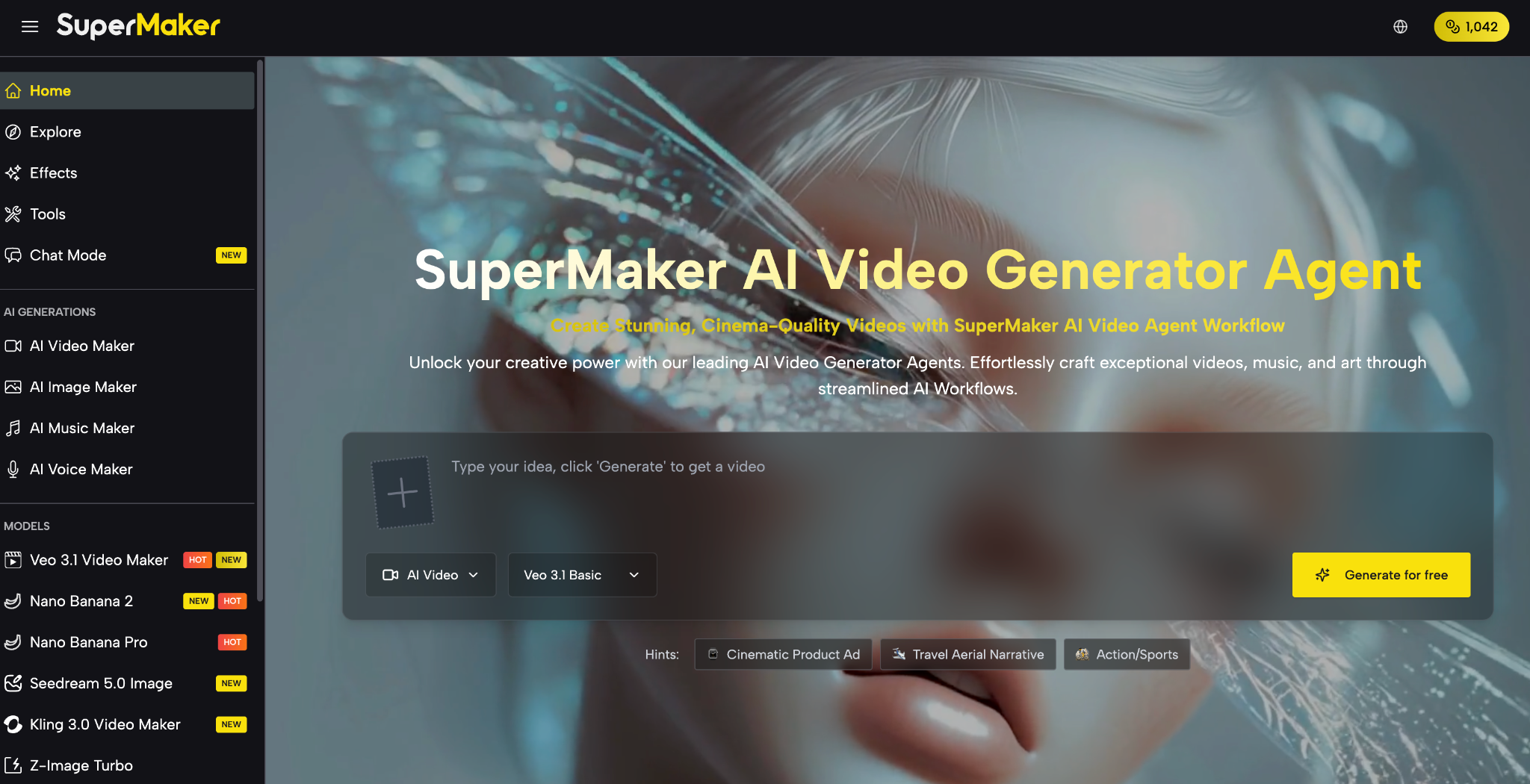
SuperMaker AI brings everything into one integrated creative environment, with an AI Video Maker at its core and connected image, music, voice, and canvas tools around it. SuperMaker AI Video Maker turns text and images into cinematic videos, while the broader suite helps you script, storyboard, and polish full productions from idea to final export.
Why Choose SuperMaker AI for AI Video Maker
SuperMaker is built as an all‑in‑one AI video generator with audio, not just a single feature page. Its AI Video Maker, AI Image Maker, AI Music Maker, AI Voice Maker, and AI Canvas Workflow Studio are designed to work together so you can go from a prompt to a complete cinematic experience on one platform.
Instead of juggling separate tools, you can generate scripts, transform text or images into video, add voiceovers and music, and manage assets and workflows within the same ecosystem. This reduces friction, speeds up production, and makes complex video workflows feel accessible even if you’re not a technical editor.
Real Scenarios Highlighted on the Website
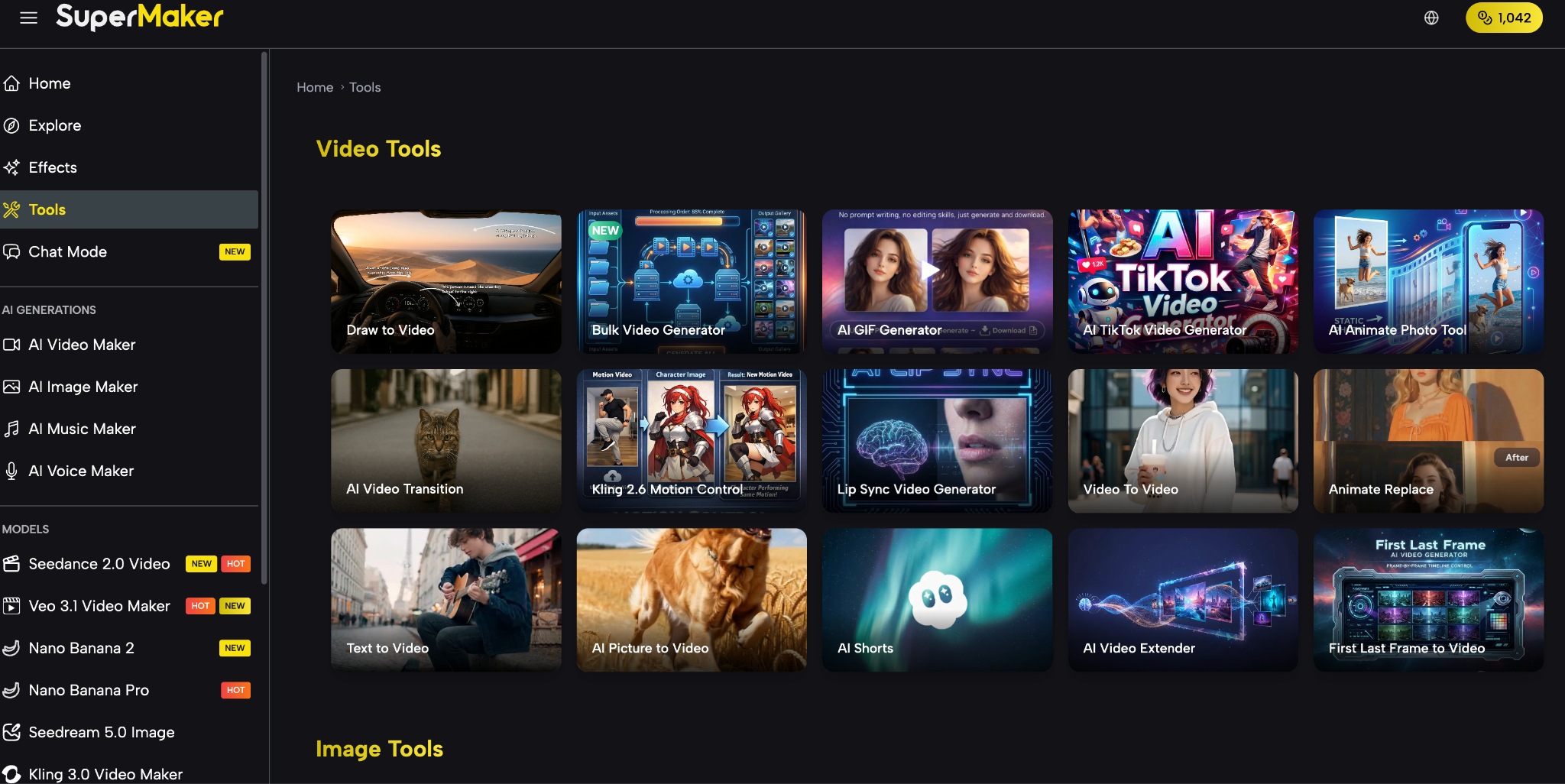
SuperMaker doesn’t just talk about use cases—it showcases them across its AI Video Maker and AI Image Maker pages and creative tools.
- Marketing and advertising videos: turn ad copy or product shots into promo clips using Text-to-Video and Image-to-Video.
- Social media content: generate short, shareable videos from text updates or images for platforms like TikTok and Instagram.
- Educational and training materials: convert lesson plans and diagrams into visual explanations and animated sequences.
- Film and episodic content: develop scripts, storyboards, and scene animatics for short films and web series.
- E‑commerce and product visuals: pair AI Image Maker product shots with Image-to-Video animations for dynamic showcases.
Core Features of SuperMaker AI for AI Video Maker
SuperMaker’s AI Video Maker sits inside a broader creative stack that covers generation, customization, multi‑modal integration, and export. Two things stand out: cinematic ambition (film‑level workflows) and practical accessibility (guided forms, clear steps, and a free plan to test).
These core capabilities are grouped across video creation, editing, multi‑modal integration, and output, all visible on the platform’s video, image, and studio pages.
AI Video Creation
SuperMaker’s AI Video Maker is built around powerful Text-to-Video and Image-to-Video engines.
- Enter scripts, articles, or descriptions and let Text-to-Video generate corresponding scenes.
- Upload reference images and animate them into dynamic video sequences via Image-to-Video.
- Use the AI Video Generator on the homepage to craft “cinema‑quality” videos from prompts and scripted story ideas.
Editing & Customization
Beyond generation, SuperMaker emphasizes control over look, structure, and quality.
- Adjust resolutions and aspect ratios to match platforms or cinematic formats.
- Use integrated scriptwriting and intelligent storyboarding tools inside the AI Video Maker to plan your narrative before rendering.
- Refine outputs with advanced video editing tools and automated post‑production helpers like AI‑assisted color correction.
Multi-Modal Capabilities
SuperMaker is multi‑modal by design, spanning video, image, voice, music, and workflows in one ecosystem.
- AI Image Maker: generate text‑to‑image visuals, concept art, and product imagery to feed directly into video projects.
- AI Voice Maker: create natural voiceovers in various languages and styles for your videos.
- AI Music Maker: compose original, royalty‑free soundtracks tailored to your project’s mood and pacing.
- AI Canvas Workflow Studio: connect text, image, and video nodes on an infinite canvas for complex pipelines like Text → Image → Video.
Export & Output
SuperMaker emphasizes professional, usable output, not just quick previews.
- Download videos in MP4 format from the AI Video Maker.
- Export high‑resolution, watermark‑free images and videos from Studio and AI Image Maker for commercial use on paid plans.
- Save and manage all generated assets in a cloud‑based library with history and version tracking.
How SuperMaker AI Video Maker Works
SuperMaker keeps its AI Video Maker workflow simple and guided, while still supporting advanced use cases behind the scenes. The process follows three clear steps that appear across the AI Video Maker and Studio pages.
Step 1 – Access the Tool
Start from the AI Video Maker page or the main SuperMaker interface.
You can open the video generator directly or launch a project in AI Canvas Workflow Studio if you prefer a visual pipeline.
Step 2 – Enter Input & Configure
Provide your input and set the basics.
- Choose Text-to-Video or Image-to-Video, then enter your description or upload images.
- Select resolution and aspect ratio, and, if needed, configure models or styles via Studio’s nodes.
Step 3 – Generate & Export
Once configured, let SuperMaker handle rendering.
- Click Generate to create your video and preview it inside the interface or canvas.
- Download the MP4 file or move the asset into broader workflows with AI Voice Maker, AI Music Maker, or Studio for further refinement.
How to Choose the Right Plan
SuperMaker AI runs on a credit-based subscription, billed monthly or annually, with credits shared across the video, image, voice, and music tools.
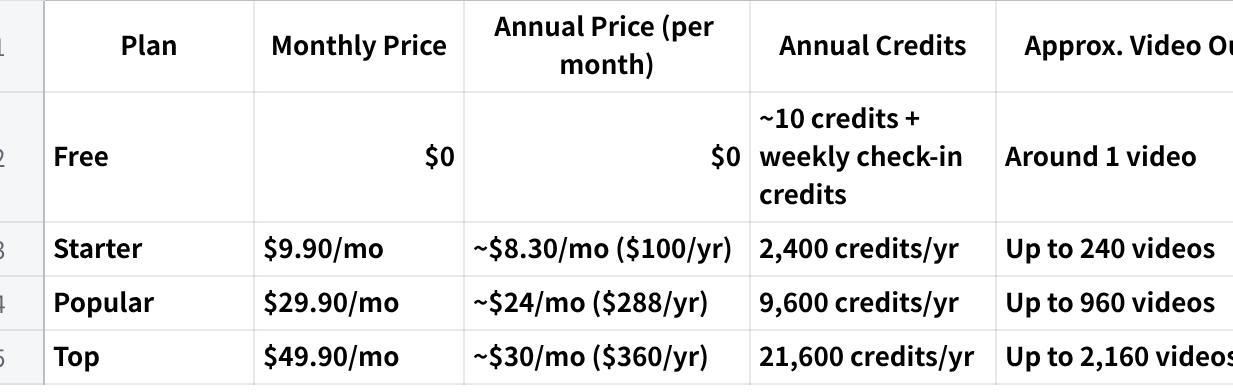
点击图片可查看完整电子表格
Frequently Asked Questions
Who is SuperMaker AI Video Maker for?
SuperMaker AI Video Maker is built for marketers, content creators, educators, businesses, filmmakers, and hobbyists who want to create engaging video without traditional production overhead. It’s accessible enough for beginners but includes scriptwriting, storyboarding, and canvas workflows that appeal to advanced users.
Do I need editing or technical skills to use it?
No. SuperMaker’s Text-to-Video and Image-to-Video tools rely on guided forms and prompts, with the AI Video Generator handling most of the complexity. The interfaces for AI Video Maker, AI Image Maker, and Studio are designed to be intuitive so you can build sophisticated outputs without deep editing expertise.
What kind of output can I expect?
You can generate cinema‑quality visuals, full narrative videos, short clips for social media, explainer videos, and animated storyboards, all exported as MP4 and supported by integrated voice and music tools. Premium usage includes high‑resolution, watermark‑free exports with commercial rights, suitable for professional projects and campaigns.
How does pricing and access work?
SuperMaker offers a free plan that unlocks core tools like Studio’s infinite canvas, multiple image models, Veo video models, and high‑res exports with daily credits. Premium plans build on that base, adding priority processing, extra credits, and commercial rights for images and videos generated on the platform.
Conclusion
If you’re looking for an AI Video Maker that goes beyond basic prompts and clips, SuperMaker stands out by connecting video, image, voice, music, and workflows into one cohesive creative environment. You can start with a simple script or image and grow into full cinematic pipelines—all while keeping assets and processes organized.
Whether you’re shipping weekly ad campaigns, building online courses, or visualizing film concepts, SuperMaker’s integrated tools help you move from idea to polished output faster, with more creative control and less friction. Explore the AI Video Maker and Studio today to see how it fits into your content workflow.
4 টি মন্তব্য