

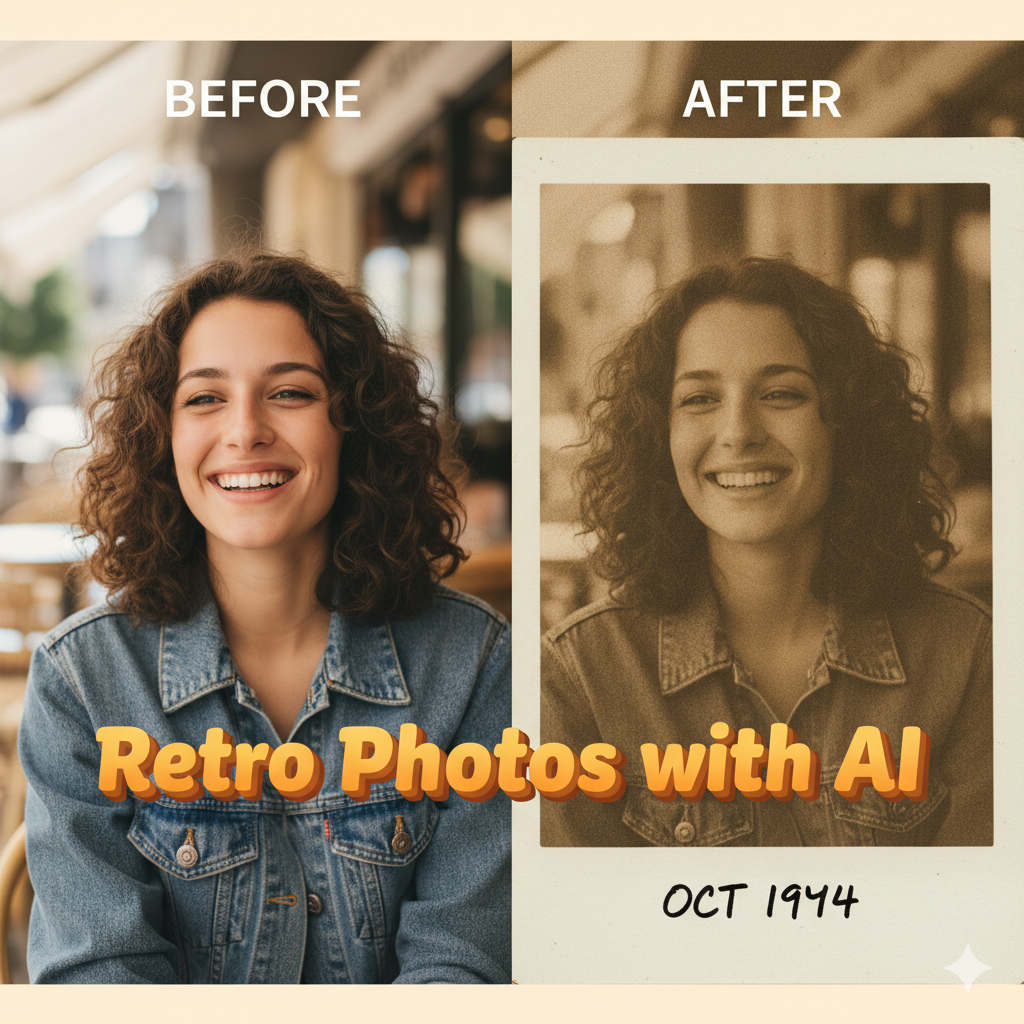

20 Gemini AI Retro-Style Vintage Photo Editing Prompts
AI ফটো এডিটিং এর যুগে, Gemini AI রেট্রো-স্টাইলের ভিন্টেজ ছবি তৈরির জন্য একটি জনপ্রিয় টুল হিসেবে পরিচিতি পেয়েছে। ভিন্টেজ এডিটিং-এর একটি বিশেষ আকর্ষণ রয়েছে, যা ছবিকে নস্টালজিক, শৈল্পিক এবং স্টাইলিশ করে তোলে। যারা ফটোগ্রাফি নিয়ে পরীক্ষা-নিরীক্ষা করতে ভালোবাসেন, তাদের জন্য Gemini AI সহজে ব্যবহারযোগ্য প্রম্পট অফার করে, যা সাধারণ ছবিকে অসাধারণ রেট্রো ভিজ্যুয়ালে রূপান্তরিত করে। এই নিবন্ধে ২০টি রেট্রো-স্টাইল ফটো এডিটিং প্রম্পট এবং একটি ধাপে ধাপে প্রক্রিয়া ব্যাখ্যা করা হয়েছে যা নতুন এবং উত্সাহীদের অনায়াসে পেশাদার-সুদর্শন ফলাফল অর্জন করতে সহায়তা করবে।
1. Classic Polaroid Effect

Prompt: “Transform my photo into a vintage Polaroid with soft white borders and warm tones.”
Step: Upload the photo to Gemini AI, choose the Polaroid effect, adjust brightness and contrast, then apply warm color grading.
2. Sepia Nostalgia

Prompt: “Convert my image to sepia with grain texture for a 1970s feel.”
Step: Apply sepia filter, add subtle grain, and slightly increase vignette for an authentic vintage look.
3. Retro Film Strip

Prompt: “Create a retro film strip effect with faded colors and scratches.”
Step: Select film strip template, adjust saturation, and add faded scratches for authenticity.
4. Faded Pastel Colors

Prompt: “Edit my photo with soft pastel tones and a dreamy vintage feel.”
Step: Use pastel filter, lower highlights, and enhance shadows to get a soft, dreamy retro look.
5. Vintage Street Style

Prompt: “Turn my urban photo into a 1980s street style image with warm hues.”
Step: Enhance contrast, apply warm filter, and add subtle film grain.
6. Retro Sunset Glow

Prompt: “Add a retro sunset glow with warm orange and pink tones.”
Step: Adjust color temperature, overlay soft sunset gradients, and reduce sharpness slightly.
7. VHS Effect

Prompt: “Give my photo a VHS tape look with scan lines and retro distortion.”
Step: Apply VHS filter, add scan lines, and lightly blur edges for realism.
8. Old School Portrait

Prompt: “Transform my portrait into a classic 1950s style photo with soft focus.”
Step: Apply soft focus, warm tone, and subtle vignette.
9. Grainy Monochrome

Prompt: “Convert my image to black-and-white with heavy film grain.”
Step: Use black-and-white filter, add grain texture, and slightly increase contrast.
10. Retro Travel Poster

Prompt: “Turn my photo into a vintage travel poster with bold colors.”
Step: Increase saturation, apply retro poster filter, and overlay text if needed.
11. Classic Car Vibes

Prompt: “Give my photo a 1960s classic car vibe with warm tones.”
Step: Enhance golden hues, reduce saturation in shadows, and add subtle film scratches.
12. Polished Retro Glam

Prompt: “Edit my photo like 1970s fashion magazine cover with glossy finish.”
Step: Apply warm filter, enhance brightness, and sharpen details carefully.
13. Grainy Summer Vibes

Prompt: “Transform my beach photo with retro summer look and faded colors.”
Step: Desaturate slightly, add light grain, and overlay warm sunlight glow.
14. Old-Fashioned Café Mood

Prompt: “Create a cozy café vintage effect with warm highlights.”
Step: Apply warm filter, increase shadow depth, and add subtle light leaks.
15. Retro Concert Feel

Prompt: “Make my concert photo look like a 1980s rock show poster.”
Step: Enhance contrast, use bold colors, and add light grain or noise.
16. Vintage Nature Look

Prompt: “Give my forest photo a muted retro tone with faded greens.”
Step: Reduce saturation, apply warm filter, and add film grain.
17. Classic Polaroid Collage

Prompt: “Arrange multiple photos in a retro Polaroid collage with pastel tones.”
Step: Use collage template, apply Polaroid borders, and adjust tones.
18. Soft Focus Retro Portrait

Prompt: “Edit my portrait with dreamy soft focus and muted colors.”
Step: Apply soft blur, reduce highlights, and enhance warm tones.
19. Vintage Party Vibes

Prompt: “Turn my party photo into a retro 1980s celebration with neon lights.”
Step: Apply neon glow, increase saturation selectively, and add subtle noise.
20. Classic Black & White Drama

Prompt: “Convert my photo into a dramatic black-and-white vintage look.”
Step: Increase contrast, add deep shadows, and apply grain texture.
উপসংহার
Gemini AI ব্যবহার করে, রেট্রো-স্টাইলের ভিন্টেজ ছবি তৈরি করা এখন আগের চেয়ে অনেক সহজ। এই ২০টি প্রম্পট এবং ধাপে ধাপে প্রক্রিয়া অনুসরণ করে, আপনি অনায়াসে আপনার সাধারণ ছবিগুলিকে নস্টালজিক এবং শৈল্পিক দৃশ্যে রূপান্তরিত করতে পারেন। বিভিন্ন রঙের টোন, গ্রেইন এবং ফিল্টার নিয়ে পরীক্ষা-নিরীক্ষা করে আপনি অনন্য ভিন্টেজ এডিট তৈরি করতে পারবেন যা সোশ্যাল মিডিয়া বা ব্যক্তিগত সংগ্রহে আলাদাভাবে নজর কাড়বে। আপনি একজন শিক্ষানবিস বা ফটোগ্রাফি উত্সাহী যাই হোন না কেন, Gemini AI রেট্রো ফটো এডিটিং-এর আকর্ষণ অন্বেষণ করার একটি সহজ উপায় সরবরাহ করে।
7 টি মন্তব্য